bota
Bota - the ultimate Telegram bot hosting built with PHP, powered by NovaGram Library!
Setting up the Bot Panel
The Bot Panel is a tool that allows you to manage the settings for your bot. To set up the Bot Panel, you will need to create a panel.json command with the following example information:
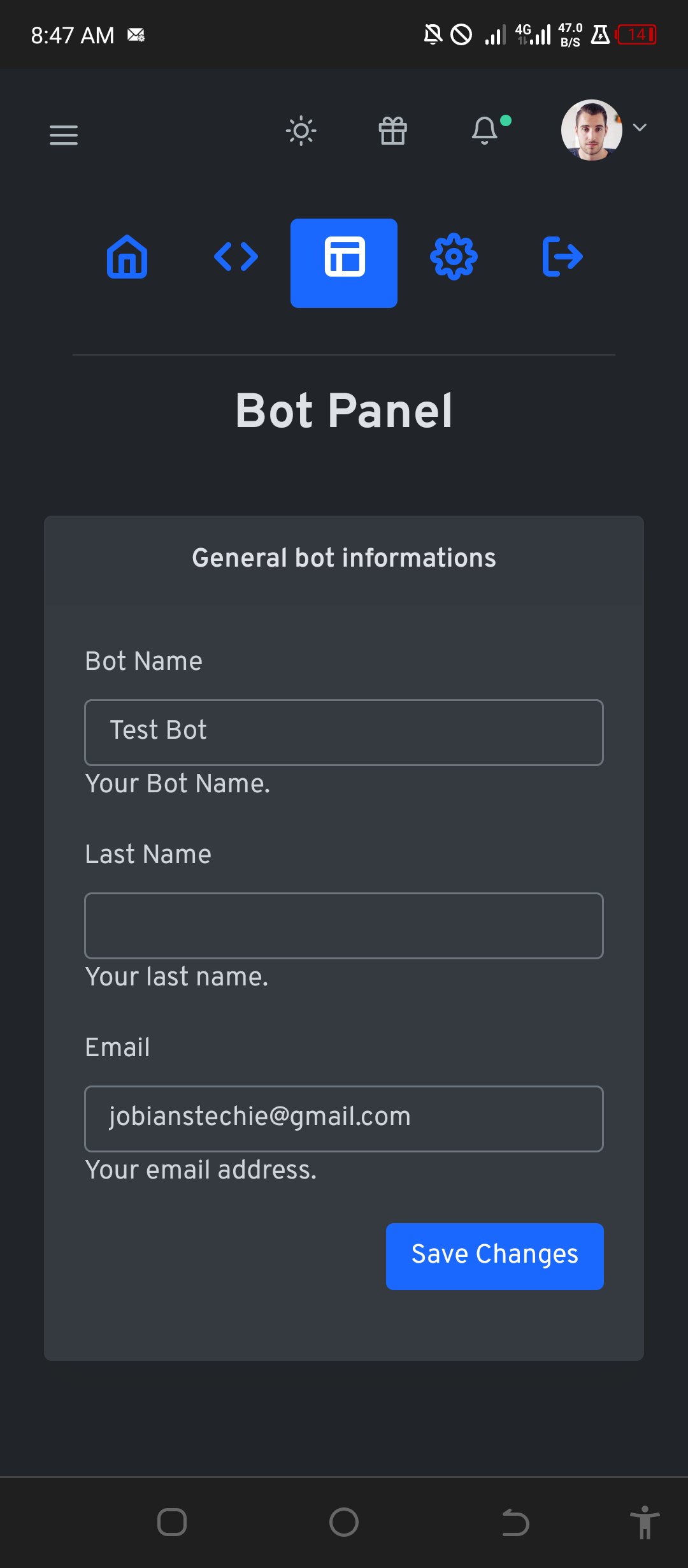
panel.json command format
{
    "description": "General bot informations",
    "button_title": "Save Changes",
    "fields": [
        {
            "name": "bot_name",
            "title": "Bot Name",
            "type": "text",
            "value": "Test Bot",
            "description": "Your Bot Name."
        },
        {
            "name": "last_name",
            "title": "Last Name",
            "type": "text",
            "value": "",
            "description": "Your last name."
        },
        {
            "name": "email",
            "title": "Email",
            "type": "email",
            "value": "jobianstechie@gmail.com",
            "description": "Your email address."
        }
    ]
}
description
The description field is a short description of the bot settings that will be managed in the Bot Panel.
button_title
The button_title field is the text that will be displayed on the button used to save changes made to the bot settings.
fields
The fields field is an array of objects, each of which represents a field in the Bot Panel. Each object has the following fields:
name: A unique name for the field.title: The title of the field that will be displayed to the user.type: The type of field.value: The default value of the field.description: A description of the field that will be displayed to the user.
Using the Bot Panel
Here is an example of how to use the $Panel function to extract the field values from the bot panel:
// Extract the field values from the bot panel
$bot_name = $Panel->getValue('bot_name');
$last_name = $Panel->getValue('last_name');
$email = $Panel->getValue('email');

// Use the field values in your Bot code
$User->sendMessage("The bot name from the panel is $bot_name");
$User->sendMessage("The last name from the panel is $last_name");
$User->sendMessage("The email from the panel is $email");
In this example, we’re using the getValue() method of the $Panel function to retrieve the value of the bot_name field from the Bot panel.
You can also use the getValue() method to get the values of other fields in the bot panel by passing in the name of the field you want to retrieve.
<?php
$name = "bot_name"; // the unique name from the panel field
$name_value = $Panel->getValue($name);
$User->sendMessage("The bot name from the panel is $name_value");